
Vocabulary Builder - TeachingM - Google Play
You'll be able to see results in few seconds.
Publisher Description
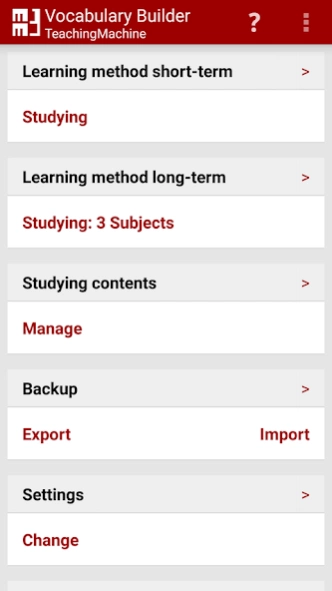
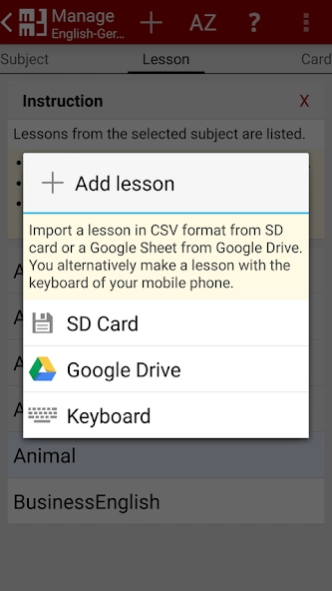

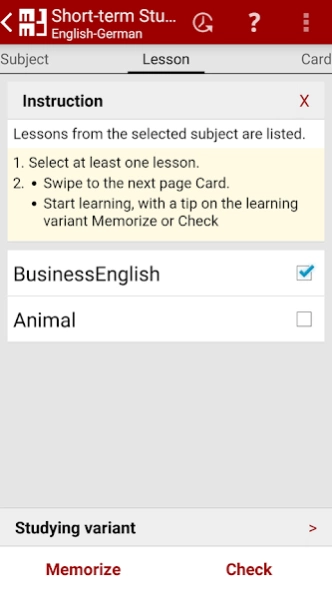
Coach for examination & imprinting into your long-term memory of e.g. vocabulary
Your trainer for easily learning new words or flashcards. Choose between studying short-time for an examination or store facts permanently into your long-term memory. You can fully concentrate on studying. No inputs are necessary before you start memorizing new words. This restricted input option is optimal for the small displays of smartphones.
The MM3 Teaching Machine efficiently trains your learning progress according to an optimized system of flashcards.
::: How it works :::
Learning consists for the most part of memorizing facts. The facts must be repeated regularly. For an effective repetition flashcards have been used for a long time. Flashcards as a vocabulary trainer are known for learning different languages, e.g. English, German, Spanish or another. The principle, however, isn't limited to vocabulary and new words. You can effectively train e.g. historical dates, names of people, financial figures etc. with index cards.
The facts are written down on cards in the form of a question and answer text. A question is written on one side of the card and the corresponding answer is written on the other side. Categorizing the flashcards in several compartments within a box you repeat the facts so often until you memorize them.
In the MM3 Teaching Machine questions and answers are exchangeable so that you can check your learning progress in two directions. You can question e.g. a vocabulary as well in the mother tongue as in the foreign language. Your learning progress is stored in both directions. The reversal of question and answer supports your learning process.
::: Your Benefits :::
With the TeachingMachine you train according to the principle of a flashcard, with right answers or wrong answers.
- Your mobile phone guarantees studying at any time and at any place and without internet connection.
- Questions & answers can often be mixed up. Your learning progress is saved in both directions.
- Construction of your personal fact archive.
- You can divide the facts to be learned into several lessons. Furthermore you can summarize several lessons on a subject.
- Within a subject (category) you can train a lesson but also several lessons at the same time.
- The number of boxes and their meanings can be defined individually. You repeat facts, which you can remember only with difficulties, more often. On the other hand, facts your already know are queried considerably less. Due to an optimized strategy your studying time is minimized.
- You can choose between studying short-time for an examination or you store the facts permanently into your long-term memory.
- Examples and user guide are integrated in the app.
With the Vocabulary Builder you can effectively and efficiently learn your factual knowledge permanently for school and professional life, for the preparation for examinations and vocabulary tests. Build up your personal knowledge archive at the same time. Use the vocabulary builder as your mobile coach.
You can use Google Drive™ (Google Docs Spreadsheets) or local the CSV-format (Excel) for the import and export of your word lists. You can simply create questions and answers with Excel using your own PC. Dictionaries and flashcards are also offered in the CSV-format free of charge on the Internett.
Download now and install the free Android app MM3-TeachingMachine, your mobile vocabulary trainer.
About Vocabulary Builder - TeachingM
The company that develops Vocabulary Builder - TeachingM is MM3Tools. The latest version released by its developer is 1.0 .
To install Vocabulary Builder - TeachingM on your Android device, just click the green Continue To App button above to start the installation process. The app is listed on our website since 2019-05-31 and was downloaded 0 times. We have already checked if the download link is safe, however for your own protection we recommend that you scan the downloaded app with your antivirus. Your antivirus may detect the Vocabulary Builder - TeachingM as malware as malware if the download link to de.mm3.teachingmachine is broken.
How to install Vocabulary Builder - TeachingM on your Android device:
- Click on the Continue To App button on our website. This will redirect you to Google Play.
- Once the Vocabulary Builder - TeachingM is shown in the Google Play listing of your Android device, you can start its download and installation. Tap on the Install button located below the search bar and to the right of the app icon.
- A pop-up window with the permissions required by Vocabulary Builder - TeachingM will be shown. Click on Accept to continue the process.
- Vocabulary Builder - TeachingM will be downloaded onto your device, displaying a progress. Once the download completes, the installation will start and you'll get a notification after the installation is finished.
Program Details
System requirements
Download information
Pricing
Version History
version
posted on 2019-05-31
- Query direction can also be selected during long-term studying.
- The file to be imported for a lesson can be selected faster by filtering or searching.
- In lists long names about several lines are displayed completely.
- Instructions and functions described with hidden explanatory texts.
- Question&Answer can be corrected during learning.
If there are any questions or problems please contact us by email to TeachingMachine@MM3Tools.com
We'll like to answer your inquiries
version
posted on 2017-08-31
- Google-Sheet: A table can now consist of several sheets.
When importing, a table sheet can be selected.
- Dialog improves for authorization to write to SD card for Android 6 and 7.
- Dialog improves for authorization to read from Google Sheets for Android 6 and 7.
- Several optimisation and smaller bug-fix.
If there are any questions or problems please contact us by email to TeachingMachine@MM3Tools.com
version
posted on 2016-10-28
28-Oct-2016,- Android 6: Import from a Google Spreadsheets,- Several optimisation and smaller bug-fix,18-May-2016,- Adaptation to store on SD card for Android 5 and 6.,- With the Long-term Studying the day is indicated for every subject for the next check.,- Colors in the user interface optimises.,1-Feb-2016,- Bugfix: CSV-Import,If there are any questions or problems please contact us by email to TeachingMachine@MM3Tools.com,We'll like to answer your inquiries
Disclaimer
Official Google Play Link
We do not host Vocabulary Builder - TeachingM on our servers. We did not scan it for viruses, adware, spyware or other type of malware. This app is hosted by Google and passed their terms and conditions to be listed there. We recommend caution when installing it.
The Google Play link for Vocabulary Builder - TeachingM is provided to you by apps112.com without any warranties, representations or guarantees of any kind, so access it at your own risk.
If you have questions regarding this particular app contact the publisher directly. For questions about the functionalities of apps112.com contact us.
